
Passkeys and WebAuthn
Understand passkey registration and sign-in, public-key challenges, phishing resistance, and the recovery choices that still matter.
A credential for the intended service
A passkey is a discoverable public-key credential used for Authentication through WebAuthn. The service, known as the relying party, stores a public key. An authenticator controls the corresponding private key material. Sign-in uses a cryptographic response to a challenge rather than sending a reusable shared password to the website.
A correctly implemented WebAuthn flow scopes the credential to the relying party and verifies the expected origin and other required values. This is central to phishing resistance: copying the appearance of a login page does not automatically make the credential usable for that copy.
Registration creates a relationship
Imagine a fictional learner, Hana, adds a passkey to her academy account. The service first needs an authorized account context so it knows whose account is receiving the new credential. The browser and authenticator participate in registration, and the server verifies the response before storing the credential's public information.
The important question is not merely whether registration succeeds. If an attacker with insufficient account control can add their own passkey to Hana's account, the attacker may gain a durable way to sign in. Credential enrollment belongs in the security review alongside the later login.
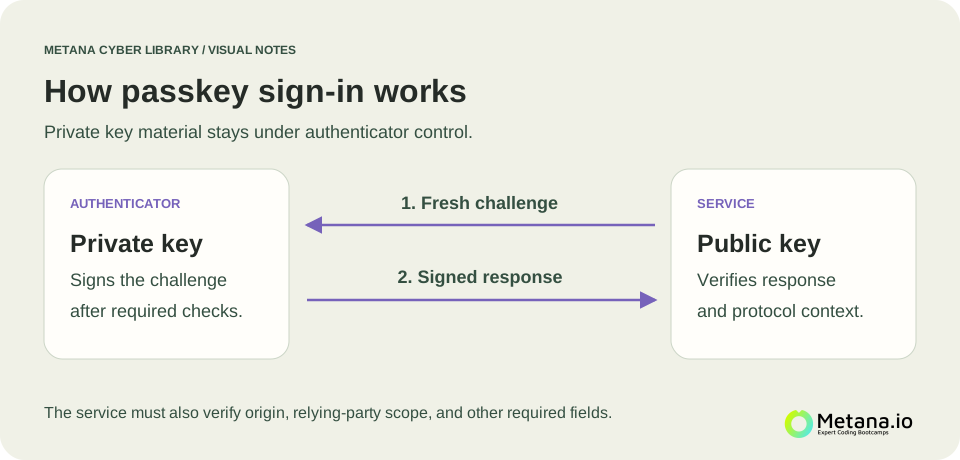 Passkey sign-in sends a fresh challenge to the authenticator and verifies a signed response using the registered public key. Open full-size diagram ↗
Signing in without sending the private key
Later, Hana opens the genuine service. The server creates a fresh challenge, the authenticator produces an appropriate signed response, and the server validates it against the registered public key and protocol requirements. The private key is not sent to the relying party as a login secret.
A device may ask Hana for a PIN or biometric verification before using the authenticator. User presence and user verification are different properties; simply touching a device is not identical to verifying its user. Application policy should specify what evidence is required.
Synced and device-bound choices
Some passkeys are synchronized by a credential provider, while others remain bound to a particular authenticator. These choices change convenience, recovery, and the dependencies the organization must evaluate. Avoid assuming that every passkey has the same storage and recovery properties.
For Hana, synchronization could make a replacement device easier to use. For an organization with a stricter assurance requirement, a particular device-bound arrangement might fit its policy. The decision should describe the requirement and recovery model rather than relying on the passkey label alone.
Strong sign-in still needs a lifecycle
Consider a lost phone, an employee departure, or a passkey added unexpectedly. The service needs credential-management and Secure account recovery processes. Users should be able to understand which authenticators are registered and how to remove one safely.
A session established after authentication is another credential to protect. Sessions and cookies explains why stealing an active session is a different problem from tricking a passkey authentication ceremony.
For implementation, use a maintained WebAuthn server library and current primary guidance rather than constructing the verification logic from a simplified diagram. For a beginner exercise, explain where the private key lives, what the server stores, and why an authorized enrollment process is essential. Continue with Multifactor authentication to compare the broader authentication choices.
References & further reading
Original explanations, with primary references for deeper study.
OWASP: Passkey Security